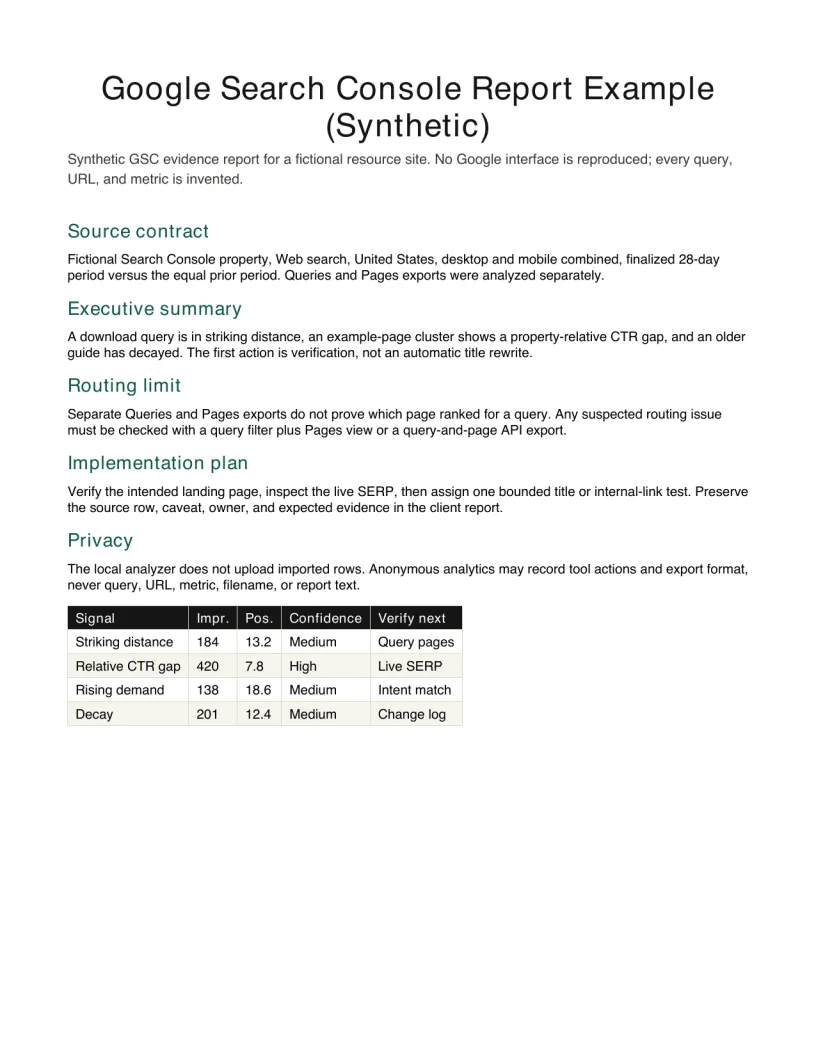
 Actual first page · synthetic PDF
Google Search Console report example
This synthetic report shows a Search Console evidence report that turns query-page observations into a prioritized verification queue. It includes query-page evidence, verification limits, prioritized opportunities and owners and can be downloaded as a PDF. Use it as a structural reference, not as real client data. Use after exporting Search Console data and before assigning page changes.
- Best for
- Use after exporting Search Console data and before assigning page changes.
- File
- Complete PDF with a real first-page preview
- Boundary
- Fictional business and synthetic evidence; not a case study or site performance
- Next step
- Replace the structure with verified inputs in the matching template or generator
What a Search Console opportunity report should do
This synthetic Google Search Console report example turns query and page exports into a bounded decision document. It is not a screenshot of the Search Console interface and it does not claim that a query caused a conversion. The fictional rows show how to report striking-distance queries, site-relative CTR gaps, rising demand, decay, and page opportunities while preserving the evidence and the verification step for each finding.
The report is the delivery layer after analysis. Use the local GSC Opportunity Engine to identify candidate findings, select only the ones that matter, and hand them into the existing SEO report generator. This PDF demonstrates the final narrative: what the data shows, what it cannot show, what should be checked next, and who owns the work.
Query evidence, page evidence, and limits
Each finding records the source period, subject, observed signal, rule, confidence, and verification step. Query and page evidence stay separate unless the export or API result explicitly preserves the relationship. A Queries export beside a Pages export cannot prove which page ranked for a query, so the sample never converts that coincidence into an automatic cannibalization claim.
The executive summary prioritizes one title or snippet test, one content or internal-link opportunity, and one decline to investigate. It also names the data limitation that could change the recommendation. The implementation tracker then assigns an owner and the future evidence required, such as a stable finalized comparison window or a query-filtered Pages view.
- Name the exact Search Console property, search type, filters, and finalized date range.
- Keep clicks, impressions, CTR, and average position attached to the observed row.
- Use property-relative CTR bands rather than a universal benchmark presented as fact.
- Verify query-to-page routing before diagnosing cannibalization or moving a canonical target.
Fields in the GSC evidence report
The field map makes the analysis reproducible. Signal states what changed, evidence keeps the observed row, confidence reflects sample strength, and verify next names the manual check required before implementation. The action is a proposal, not a forecast.
| Field | Purpose | How to use it |
|---|---|---|
| Signal and rule | The observed Search Console pattern and deterministic rule. | Keep the rule attached to the row so another analyst can reproduce the shortlist. |
| Evidence | Clicks, impressions, CTR, position, source, and period. | Preserve the observed values and filters; never send query, URL, or metric data to analytics. |
| Confidence | How much sample support the finding has. | Use confidence to prioritize verification, not as a traffic forecast or keyword difficulty score. |
| Verify next | The manual check required before implementation. | Inspect query-to-page routing and the live SERP before diagnosing cannibalization or changing a canonical target. |
Recreate the workflow with your own export
Export current Queries data from Search Console and, when useful, an equal-length prior period plus current Pages data. Analyze those CSV files locally in the GSC Opportunity Engine. Review the deterministic shortlist, select the findings that affect a real decision, and send them to the SEO report generator in the same browser tab. The source rows are not uploaded, and analytics events do not include queries, URLs, filenames, or metrics.
Before delivery, inspect the affected query and page in Search Console, check the live SERP, and remove any finding that does not survive verification. Then assign an owner, an implementation date, and the evidence the next finalized reporting window should show. Download this sample only to study the structure; replace every synthetic row before using it with a client.
Google Search Console report example FAQ
Is this Search Console report based on a real property?
No. The property, queries, URLs, dates, and metrics are synthetic. They demonstrate a reporting structure only. Use your own verified Search Console export for any client conclusion.
Does the report automatically detect keyword cannibalization?
No. Separate Queries and Pages exports do not preserve the query-to-page relationship. Verify a suspected routing issue with query-filtered page data or a query-plus-page API export before calling it cannibalization.
How is this different from the GSC Opportunity Engine?
The engine analyzes CSV rows and produces a deterministic shortlist. This example shows the client-facing delivery after a human selects and verifies findings, adds caveats, assigns owners, and states the evidence expected next.
Should I use a universal CTR benchmark?
Not as an unquestioned fact. CTR varies by brand, query intent, SERP features, device, and position. The local engine compares rows with the uploaded property's own position-band baseline and presents the result as a verification lead.
What data can be sent to analytics?
Only anonymous action events such as tool start, completion, copy, download, filter use, and format. Customer names, queries, URLs, metrics, filenames, and generated report text must never be included.