Ecommerce SEO report example
Ecommerce SEO report example and template: structure category visibility, product-page issues, index coverage, and next actions. Free, client-ready, no signup.
Original, synthetic sample data only. Every figure in this asset is a worked example — replace each sample value with your own verified analytics before sending a client report.
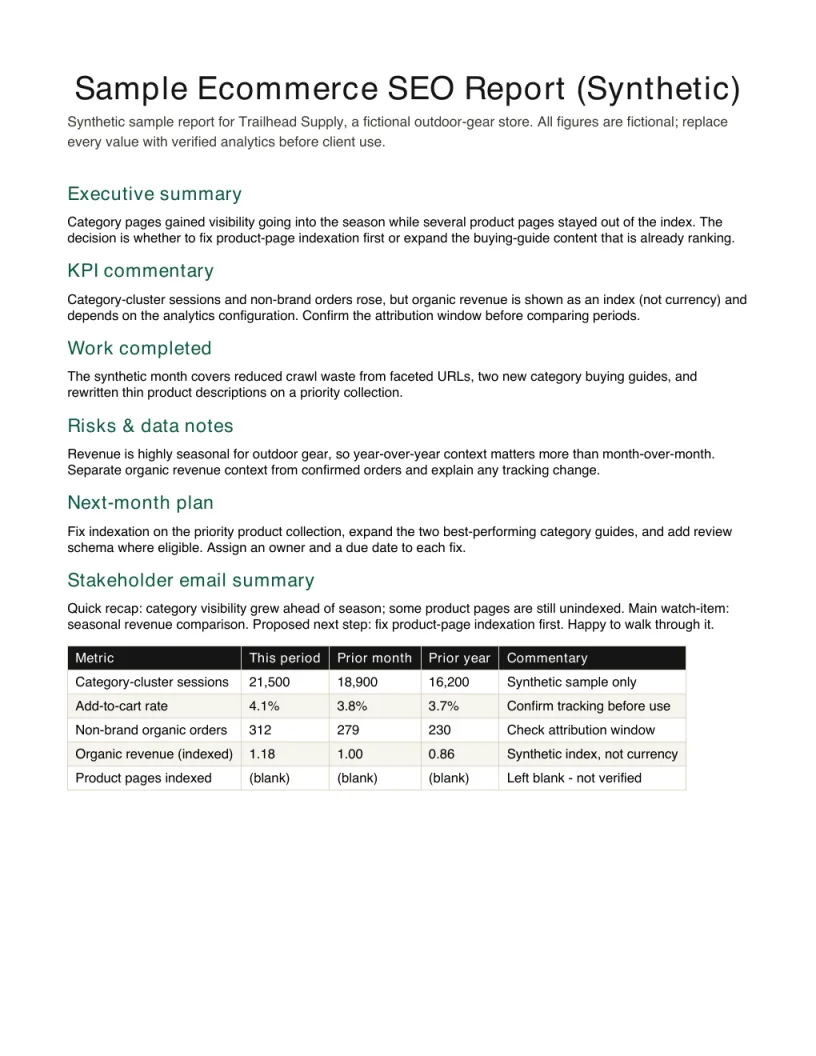
Inspect the finished report before downloading
The preview is the first page of the free PDF. Embed it with the source link intact when you reference this synthetic example.
View HTML embed code
<a href="https://seoreportkit.com/examples/ecommerce-seo-report/"><img src="https://seoreportkit.com/images/examples/sample-ecommerce-seo-report.webp" alt="First page preview of the synthetic ecommerce SEO report example" width="612" height="792"></a><p>Source: <a href="https://seoreportkit.com/examples/ecommerce-seo-report/">SEO Report Kit</a></p>Attribution links to this report example.
Browse all SEO report examplesWhat This Ecommerce Report Demonstrates
This page walks through an ecommerce SEO report example built around Trailhead Supply, a fictional online outdoor-gear store. Trailhead sells across category pages such as hiking boots, tents, and trail packs, plus hundreds of individual product pages, so its report has to do something a service-business report does not: connect organic visibility to category-level demand and to revenue, not just to sessions. The aim of the sample is to show the shape of that report, so you can see where category visibility, product-page issues, index coverage, and next actions each live.
All figures and movements described here are fictional sample data created for illustration. The point is not the numbers but the structure: how an ecommerce report groups work by category cluster, keeps revenue context next to traffic, and turns a large catalog into a short list of decisions. If you have used the SEO report template elsewhere on this site, this is the ecommerce-specific arrangement of the same idea.
Because the layout matches a general SEO report template field for field, agencies often treat this page as an ecommerce SEO report template rather than a one-off example: copy the section order, keep the category-cluster and product-page groupings, and replace every fictional Trailhead Supply figure with your own store's verified exports. Read it as a worked model you can restructure in a spreadsheet, not a fixed layout you have to follow exactly.
- Category-cluster visibility, so demand and ranking move together instead of being read page by page.
- Product-page issues grouped by type, so a catalog of hundreds collapses into a handful of fixable patterns.
- Revenue context kept beside organic traffic, so the client sees outcome and not only volume.
- Index coverage as its own block, because an ecommerce site quietly indexes or drops pages at scale.
The Situation The Report Has To Support
Trailhead Supply runs paid search and email alongside organic, so the monthly review has to separate non-brand organic orders from everything else, or the client will credit organic with conversions that paid demand actually drove. The marketing lead is not asking how many keywords rank; she is deciding where next month's development hours go, and whether the category-page work shipped last month is worth continuing. The report exists to make that decision defensible.
Because the catalog is large and seasonal, the chosen KPIs are deliberately narrow: organic revenue, add-to-cart rate from organic landings, category-cluster sessions, and non-brand organic orders. These four are enough to answer the only questions that matter this month: did organic visibility translate into qualified visits, did those visits behave like buyers, and did that show up in revenue the business can attribute to the channel rather than to brand demand.
Field Map
Every row in the sample report uses the same fields so a sprawling catalog stays sortable and the commentary stays anchored to verifiable data. The map below explains what each field is for and how to fill it from your own exports rather than re-typing a dashboard.
| Field | Purpose | How to use it |
|---|---|---|
| Non-brand organic revenue | Keeps existing brand demand separate from search acquisition work. | Use a verified analytics segment and disclose the attribution model and any tracking changes. |
| Category cluster | Groups demand and outcomes around the store navigation rather than hundreds of individual URLs. | Define clusters from the real taxonomy, then compare visibility, sessions, orders, and revenue within each. |
| Product-page pattern | Collapses repeated catalog issues into fixable template or data problems. | Name the pattern, attach example URLs, and estimate scale only from a verified crawl or inventory export. |
| Add-to-cart and orders | Shows whether organic landings behaved like qualified buyers. | Keep behavior and completed outcomes beside traffic; note consent, attribution, or checkout tracking gaps. |
| Index coverage | Surfaces catalog pages entering or leaving Google's eligible set before revenue moves. | Report verified canonical groups and sample URLs instead of treating every excluded URL as an error. |
| Seasonality and next action | Prevents predictable demand shifts from being attributed to one SEO change. | Compare an appropriate prior period, record the seasonal context, and assign one action per decision. |
Reading The Movements And Writing The Commentary
Read the report cluster first, page second. In the Trailhead sample, the hiking-boots cluster shows category sessions rising while add-to-cart rate is flat, which reads as more qualified organic traffic arriving on pages that are not yet converting it; the commentary points at product-page issues inside that cluster rather than celebrating the session gain. By contrast, the tents cluster shows orders climbing without a matching session lift, which usually means existing visits started converting better after a fix shipped, not that visibility grew. The same direction of travel means different things depending on which metric moved.
Keep revenue context honest about attribution. Non-brand organic orders are the line that tells the client whether the channel is doing new work, because brand orders rise and fall with demand you did not create. When you write the summary, name the two or three movements that change what the client should do, give each a one-line reason, and resist explaining every cluster. A Monthly SEO report KPIs page on this site covers how to keep that KPI set small enough to stay readable.
Index coverage deserves its own reading. For a store this size, a drift in indexed product pages can precede a revenue change by weeks, so the sample flags coverage movement even when sessions look stable, and routes the detail into a Google Search Console opportunity sheet rather than crowding the front page.
- Pair every session movement with a behavior metric before you call it good or bad.
- Lead the summary with non-brand organic orders, not total organic traffic.
- Treat index-coverage drift as an early signal, not an afterthought.
- Explain the few movements that change the next decision; leave the rest in the tables.
Adapting It To A Real Client
Treat the Synthetic ecommerce report notes as scaffolding, not content. Every movement, rate, and order count in the Trailhead example is fictional sample data, so the first step in a real engagement is to delete all of it and repopulate the fields from your own verified exports: revenue and orders from analytics, coverage from Search Console, visibility from your own keyword tracking. If a value is unknown, leave it blank rather than estimating it, the same discipline the SEO reporting template on this site uses throughout.
Then adjust the structure to the actual store. Define the category clusters from the client's real navigation rather than the sample's, because cluster boundaries are what make the whole report legible; a store with strong brand demand may need the non-brand split to be even more prominent. Confirm that each highlighted product-page issue has a concrete example URL and a recommended fix, and that the summary names changes the client can approve. Never paste screenshots of a third-party dashboard into the deliverable; report from your own exports so each figure is one you can stand behind.
Ecommerce SEO report example FAQ
What should an ecommerce SEO report include that a normal SEO report does not?
It needs category-cluster visibility, product-page issue patterns, and index coverage at scale, because a store has far more pages and a direct line to revenue. It also needs a clean split between non-brand organic orders and brand-driven orders, so the client does not credit organic with sales that existing demand produced. The Trailhead sample on this page is organized around exactly those additions.
Are the numbers in this ecommerce report example real?
No. Trailhead Supply is a fictional store and every figure, rate, and order count is synthetic sample data created to illustrate structure. Use the layout and the commentary logic, but replace all values with your own verified exports before sending anything to a client.
How do you show revenue in an ecommerce SEO report without overclaiming?
Keep revenue context beside organic traffic, and make non-brand organic orders the line you lead with, since brand orders move with demand you did not create. Report only what your analytics can attribute to the channel, leave gaps blank rather than estimating, and tie revenue movement to specific work that shipped rather than to overall ranking changes.
How do you report on hundreds of product pages without overwhelming the client?
Group product-page issues by type, such as thin descriptions or missing structured data, so a large catalog collapses into a handful of fixable patterns. Each pattern gets one example URL and a recommended fix on the front page, while the full list lives in an appendix or a Google Search Console opportunity sheet the client can open if they want the detail.
Which KPIs belong in a monthly ecommerce SEO report?
Keep the set small and outcome-focused: in the sample those are organic revenue, add-to-cart rate from organic landings, category-cluster sessions, and non-brand organic orders. Four KPIs that answer whether qualified visits arrived, behaved like buyers, and produced attributable revenue beat a long export of everything, and the Monthly SEO report KPIs page covers how to choose them.
Is this an ecommerce SEO report template or just an example?
Both. The page is built as a worked example so you can see how category visibility, product-page issues, and revenue context fit together, but the same structure works as an ecommerce SEO report template: keep the section order and field map, delete every Trailhead Supply figure, and rebuild the tables around your own store's categories and your own verified exports.